Great Survey Features For All Your Needs
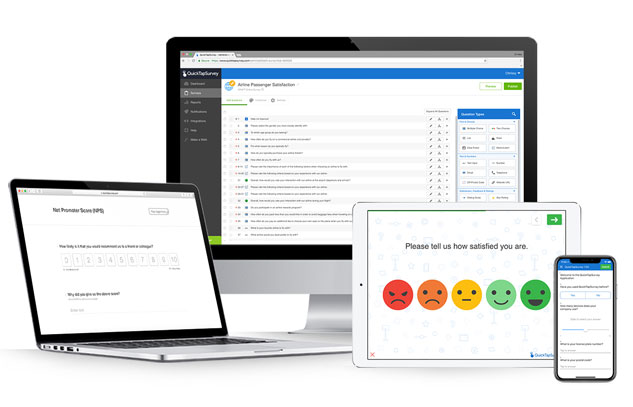
Build, customize and launch your campaigns in minutes, with 100% data coverage (no internet required).
Create My First SurveyCore Survey Features
-
Easy To Use
Get started without any technical expertise whatsoever.
-
Quick Setup
Create the perfect survey in just minutes.
-
Unlimited Data Collection - Online & Offline
All plans come with unlimited surveys and responses.
-
Works Without Internet
When offline, data is safely stored in the app until the device is re-connected.
-
Available for iOS & Android
Collect survey responses with iPads, iPhones and Android tablets or phones.
-
Fast & Accurate Input
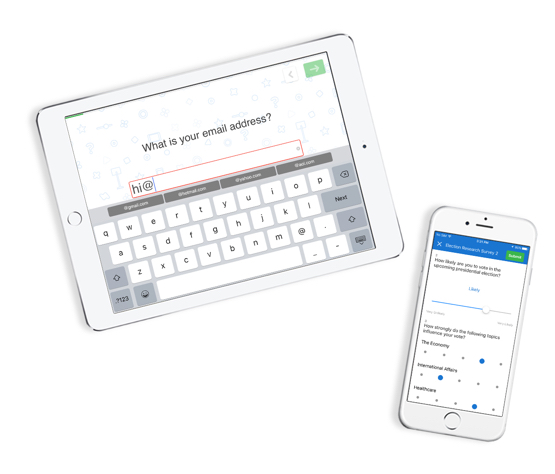
Custom keyboards and shortcuts make data entry faster, easier, and more accurate.
-
Manage Surveys Remotely
Send your survey to a device located anywhere in the world.
-
Role-Based Access Control
Create users with access to specific capabilities and surveys.
-
Secure
Data is secure on the device, at QuickTapSurvey.com and in transit.
-
Scalable
Use a single device or a thousand and manage your data in one place.
Have questions about any of our features? Have questions about any of our survey features? Contact us today to get started.
Over 180,000 Clients Worldwide
“I was tasked with setting up two iPads with keyboards for kiosks to take contest entry forms at a trade show. With time running out I was able to create an account, add two users, create an entry form and test it out in under 4 hours. I potentially could have lost a $25,000 a year account without your product.”
Matt Moormeier
President,
GPC Tech Team
“We’ve been really pleased, really pumped to use QuickTapSurvey during our game day and prospecting events throughout the year. I’m just elated as a Sales Manager to be able to decrease our follow-up campaigns from 3 weeks to 24 hours and increase our lead follow-up rates by a whopping 50%.”
Josh Ward Ticket Sales Manager, Tennessee Titans
“We often work with populations that feel more comfortable completing surveys in a face-to-face interview format. With QuickTapSurvey we can easily collect these surveys in the field, and reduce costs by saving on data entry and printing. In our most recent survey, we estimated that we saved about $25,000.”
Dr. Michaela Hynie President, Canadian Association of Refugee & Forced Migration Studies
“We used paper surveys in the past, but they were extremely difficult to manage on-site, not to mention time consuming because of all the data re-entry on Excel. We were very lucky to find QuickTapSurvey when we did.”
Irene Seijo Director, Seijo Associates Ltd.
“QuickTapSurvey is an amazing tool to gather feedback while the patient experience is fresh. It had increased our survey response rate and motivates employees to provide excellent service.”
Claire Bosma Marketing Director, Orthopaedic Associates
“QuickTapSurvey is everything I wanted from a marketing perspective. It’s very flexible, it allows for branding and even works offline! We are using it at every trade show we attend – from LA to Paris – and I haven’t experienced a single situation where I wished it could do more”
Carlos Guevara Marketing & Business Development, DOD Tech Canada
“QuickTapSurvey is so easy to use and even easier to deploy. It was the quick tool that we needed to measure and derive insights around staff compliance on flights.”
Anton Vidgen Senior Director, Customer and Technology, Air Canada Rouge
“QuickTapSurvey is an exceptionally easy tool for collecting visitor feedback and capturing email addresses. It helped improve visitor satisfaction and doubled our email capture rate.”
Thomas Zydel Director of Visitor Services & Membership Virginia Museum of Fine Arts
“QuickTapSurvey is in a league of its own and is the answer to all your lead generation needs. It's an extremely powerful tool, easy to use and the pricing structure makes it very affordable to all. 11/10 Would definitely recommend!”
Erin Dupuis Graphic & Digital Specialist, Trafalgar Tours
“I was tasked with setting up two iPads with keyboards for kiosks to take contest entry forms at a trade show. With time running out I was able to create an account, add two users, create an entry form and test it out in under 4 hours. I potentially could have lost a $25,000 a year account without your product.”
Matt Moormeier
President,
GPC Tech Team
“We’ve been really pleased, really pumped to use QuickTapSurvey during our game day and prospecting events throughout the year. I’m just elated as a Sales Manager to be able to decrease our follow-up campaigns from 3 weeks to 24 hours and increase our lead follow-up rates by a whopping 50%.”
Josh Ward Ticket Sales Manager, Tennessee Titans
“We often work with populations that feel more comfortable completing surveys in a face-to-face interview format. With QuickTapSurvey we can easily collect these surveys in the field, and reduce costs by saving on data entry and printing. In our most recent survey, we estimated that we saved about $25,000.”
Dr. Michaela Hynie President, Canadian Association of Refugee & Forced Migration Studies
“We used paper surveys in the past, but they were extremely difficult to manage on-site, not to mention time consuming because of all the data re-entry on Excel. We were very lucky to find QuickTapSurvey when we did.”
Irene Seijo Director, Seijo Associates Ltd.
“QuickTapSurvey is an amazing tool to gather feedback while the patient experience is fresh. It had increased our survey response rate and motivates employees to provide excellent service.”
Claire Bosma Marketing Director, Orthopaedic Associates
“QuickTapSurvey is everything I wanted from a marketing perspective. It’s very flexible, it allows for branding and even works offline! We are using it at every trade show we attend – from LA to Paris – and I haven’t experienced a single situation where I wished it could do more”
Carlos Guevara Marketing & Business Development, DOD Tech Canada
“QuickTapSurvey is so easy to use and even easier to deploy. It was the quick tool that we needed to measure and derive insights around staff compliance on flights.”
Anton Vidgen Senior Director, Customer and Technology, Air Canada Rouge
“QuickTapSurvey is an exceptionally easy tool for collecting visitor feedback and capturing email addresses. It helped improve visitor satisfaction and doubled our email capture rate.”
Thomas Zydel Director of Visitor Services & Membership Virginia Museum of Fine Arts
“QuickTapSurvey is in a league of its own and is the answer to all your lead generation needs. It's an extremely powerful tool, easy to use and the pricing structure makes it very affordable to all. 11/10 Would definitely recommend!”
Erin Dupuis Graphic & Digital Specialist, Trafalgar Tours
Create your beautiful survey or mobile form today.
Creating & Designing Surveys
-
Over 35 Question Types
Create your survey by using more than 35 different question types.
-
Customizable Design
Select your screen layout, colors and one of many pre-designed background images.
-
Unlimited Data Collection - Skip Logic & Question Branching
Specify which question(s) to show based on the answers that have been selected.
-
Branding & Personalization
Add your logo and a custom background image to personalize the survey.
-
Professional Templates
Save time and get ideas for questions by using a survey template.
-
International Language Support
Create surveys in any international language that is supported by the UTF-8 character set.
Have questions about any of our features? Have questions about any of our survey features? Contact us today to get started.
Over 180,000 Clients Worldwide
“I was tasked with setting up two iPads with keyboards for kiosks to take contest entry forms at a trade show. With time running out I was able to create an account, add two users, create an entry form and test it out in under 4 hours. I potentially could have lost a $25,000 a year account without your product.”
Matt Moormeier
President,
GPC Tech Team
“We’ve been really pleased, really pumped to use QuickTapSurvey during our game day and prospecting events throughout the year. I’m just elated as a Sales Manager to be able to decrease our follow-up campaigns from 3 weeks to 24 hours and increase our lead follow-up rates by a whopping 50%.”
Josh Ward Ticket Sales Manager, Tennessee Titans
“We often work with populations that feel more comfortable completing surveys in a face-to-face interview format. With QuickTapSurvey we can easily collect these surveys in the field, and reduce costs by saving on data entry and printing. In our most recent survey, we estimated that we saved about $25,000.”
Dr. Michaela Hynie President, Canadian Association of Refugee & Forced Migration Studies
“We used paper surveys in the past, but they were extremely difficult to manage on-site, not to mention time consuming because of all the data re-entry on Excel. We were very lucky to find QuickTapSurvey when we did.”
Irene Seijo Director, Seijo Associates Ltd.
“QuickTapSurvey is an amazing tool to gather feedback while the patient experience is fresh. It had increased our survey response rate and motivates employees to provide excellent service.”
Claire Bosma Marketing Director, Orthopaedic Associates
“QuickTapSurvey is everything I wanted from a marketing perspective. It’s very flexible, it allows for branding and even works offline! We are using it at every trade show we attend – from LA to Paris – and I haven’t experienced a single situation where I wished it could do more”
Carlos Guevara Marketing & Business Development, DOD Tech Canada
“QuickTapSurvey is so easy to use and even easier to deploy. It was the quick tool that we needed to measure and derive insights around staff compliance on flights.”
Anton Vidgen Senior Director, Customer and Technology, Air Canada Rouge
“QuickTapSurvey is an exceptionally easy tool for collecting visitor feedback and capturing email addresses. It helped improve visitor satisfaction and doubled our email capture rate.”
Thomas Zydel Director of Visitor Services & Membership Virginia Museum of Fine Arts
“QuickTapSurvey is in a league of its own and is the answer to all your lead generation needs. It's an extremely powerful tool, easy to use and the pricing structure makes it very affordable to all. 11/10 Would definitely recommend!”
Erin Dupuis Graphic & Digital Specialist, Trafalgar Tours
“I was tasked with setting up two iPads with keyboards for kiosks to take contest entry forms at a trade show. With time running out I was able to create an account, add two users, create an entry form and test it out in under 4 hours. I potentially could have lost a $25,000 a year account without your product.”
Matt Moormeier
President,
GPC Tech Team
“We’ve been really pleased, really pumped to use QuickTapSurvey during our game day and prospecting events throughout the year. I’m just elated as a Sales Manager to be able to decrease our follow-up campaigns from 3 weeks to 24 hours and increase our lead follow-up rates by a whopping 50%.”
Josh Ward Ticket Sales Manager, Tennessee Titans
“We often work with populations that feel more comfortable completing surveys in a face-to-face interview format. With QuickTapSurvey we can easily collect these surveys in the field, and reduce costs by saving on data entry and printing. In our most recent survey, we estimated that we saved about $25,000.”
Dr. Michaela Hynie President, Canadian Association of Refugee & Forced Migration Studies
“We used paper surveys in the past, but they were extremely difficult to manage on-site, not to mention time consuming because of all the data re-entry on Excel. We were very lucky to find QuickTapSurvey when we did.”
Irene Seijo Director, Seijo Associates Ltd.
“QuickTapSurvey is an amazing tool to gather feedback while the patient experience is fresh. It had increased our survey response rate and motivates employees to provide excellent service.”
Claire Bosma Marketing Director, Orthopaedic Associates
“QuickTapSurvey is everything I wanted from a marketing perspective. It’s very flexible, it allows for branding and even works offline! We are using it at every trade show we attend – from LA to Paris – and I haven’t experienced a single situation where I wished it could do more”
Carlos Guevara Marketing & Business Development, DOD Tech Canada
“QuickTapSurvey is so easy to use and even easier to deploy. It was the quick tool that we needed to measure and derive insights around staff compliance on flights.”
Anton Vidgen Senior Director, Customer and Technology, Air Canada Rouge
“QuickTapSurvey is an exceptionally easy tool for collecting visitor feedback and capturing email addresses. It helped improve visitor satisfaction and doubled our email capture rate.”
Thomas Zydel Director of Visitor Services & Membership Virginia Museum of Fine Arts
“QuickTapSurvey is in a league of its own and is the answer to all your lead generation needs. It's an extremely powerful tool, easy to use and the pricing structure makes it very affordable to all. 11/10 Would definitely recommend!”
Erin Dupuis Graphic & Digital Specialist, Trafalgar Tours
Create your beautiful survey or mobile form today.
Face to Face & Kiosk Surveys
-
Intuitive Interface
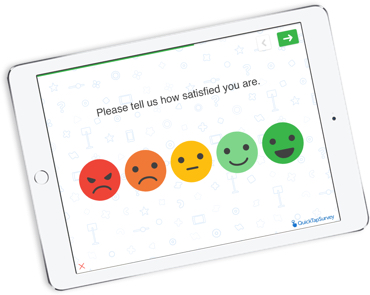
Designed for consumers to quickly and easily complete a survey.
-
Engaging Experience
Make collecting data a fun experience by using our interactive question types.
-
Turn Tablets into Kiosks
Transform your tablet into an interactive data collection kiosk.
-
Auto-Reply Email
Send a pre-configured email to the consumer immediately upon completion of the survey.
-
Accept Terms and Conditions
Record acceptance to terms and conditions.
-
Capture Signatures
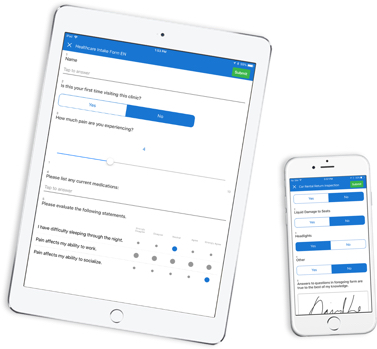
Capture a signature directly on the device screen.
-
Select a Random Winner
Randomly select a survey response to determine a winner.
-
Kiosk Failure Notifications
Send a notification to an email address when a monitored kiosk fails and when it becomes active again.
-
Active Kiosk Report
Display a list of all kiosk surveys which are currently running on a device and connected to the internet.
Have questions about any of our features? Have questions about any of our survey features? Contact us today to get started.
Over 180,000 Clients Worldwide
“I was tasked with setting up two iPads with keyboards for kiosks to take contest entry forms at a trade show. With time running out I was able to create an account, add two users, create an entry form and test it out in under 4 hours. I potentially could have lost a $25,000 a year account without your product.”
Matt Moormeier
President,
GPC Tech Team
“We’ve been really pleased, really pumped to use QuickTapSurvey during our game day and prospecting events throughout the year. I’m just elated as a Sales Manager to be able to decrease our follow-up campaigns from 3 weeks to 24 hours and increase our lead follow-up rates by a whopping 50%.”
Josh Ward Ticket Sales Manager, Tennessee Titans
“We often work with populations that feel more comfortable completing surveys in a face-to-face interview format. With QuickTapSurvey we can easily collect these surveys in the field, and reduce costs by saving on data entry and printing. In our most recent survey, we estimated that we saved about $25,000.”
Dr. Michaela Hynie President, Canadian Association of Refugee & Forced Migration Studies
“We used paper surveys in the past, but they were extremely difficult to manage on-site, not to mention time consuming because of all the data re-entry on Excel. We were very lucky to find QuickTapSurvey when we did.”
Irene Seijo Director, Seijo Associates Ltd.
“QuickTapSurvey is an amazing tool to gather feedback while the patient experience is fresh. It had increased our survey response rate and motivates employees to provide excellent service.”
Claire Bosma Marketing Director, Orthopaedic Associates
“QuickTapSurvey is everything I wanted from a marketing perspective. It’s very flexible, it allows for branding and even works offline! We are using it at every trade show we attend – from LA to Paris – and I haven’t experienced a single situation where I wished it could do more”
Carlos Guevara Marketing & Business Development, DOD Tech Canada
“QuickTapSurvey is so easy to use and even easier to deploy. It was the quick tool that we needed to measure and derive insights around staff compliance on flights.”
Anton Vidgen Senior Director, Customer and Technology, Air Canada Rouge
“QuickTapSurvey is an exceptionally easy tool for collecting visitor feedback and capturing email addresses. It helped improve visitor satisfaction and doubled our email capture rate.”
Thomas Zydel Director of Visitor Services & Membership Virginia Museum of Fine Arts
“QuickTapSurvey is in a league of its own and is the answer to all your lead generation needs. It's an extremely powerful tool, easy to use and the pricing structure makes it very affordable to all. 11/10 Would definitely recommend!”
Erin Dupuis Graphic & Digital Specialist, Trafalgar Tours
“I was tasked with setting up two iPads with keyboards for kiosks to take contest entry forms at a trade show. With time running out I was able to create an account, add two users, create an entry form and test it out in under 4 hours. I potentially could have lost a $25,000 a year account without your product.”
Matt Moormeier
President,
GPC Tech Team
“We’ve been really pleased, really pumped to use QuickTapSurvey during our game day and prospecting events throughout the year. I’m just elated as a Sales Manager to be able to decrease our follow-up campaigns from 3 weeks to 24 hours and increase our lead follow-up rates by a whopping 50%.”
Josh Ward Ticket Sales Manager, Tennessee Titans
“We often work with populations that feel more comfortable completing surveys in a face-to-face interview format. With QuickTapSurvey we can easily collect these surveys in the field, and reduce costs by saving on data entry and printing. In our most recent survey, we estimated that we saved about $25,000.”
Dr. Michaela Hynie President, Canadian Association of Refugee & Forced Migration Studies
“We used paper surveys in the past, but they were extremely difficult to manage on-site, not to mention time consuming because of all the data re-entry on Excel. We were very lucky to find QuickTapSurvey when we did.”
Irene Seijo Director, Seijo Associates Ltd.
“QuickTapSurvey is an amazing tool to gather feedback while the patient experience is fresh. It had increased our survey response rate and motivates employees to provide excellent service.”
Claire Bosma Marketing Director, Orthopaedic Associates
“QuickTapSurvey is everything I wanted from a marketing perspective. It’s very flexible, it allows for branding and even works offline! We are using it at every trade show we attend – from LA to Paris – and I haven’t experienced a single situation where I wished it could do more”
Carlos Guevara Marketing & Business Development, DOD Tech Canada
“QuickTapSurvey is so easy to use and even easier to deploy. It was the quick tool that we needed to measure and derive insights around staff compliance on flights.”
Anton Vidgen Senior Director, Customer and Technology, Air Canada Rouge
“QuickTapSurvey is an exceptionally easy tool for collecting visitor feedback and capturing email addresses. It helped improve visitor satisfaction and doubled our email capture rate.”
Thomas Zydel Director of Visitor Services & Membership Virginia Museum of Fine Arts
“QuickTapSurvey is in a league of its own and is the answer to all your lead generation needs. It's an extremely powerful tool, easy to use and the pricing structure makes it very affordable to all. 11/10 Would definitely recommend!”
Erin Dupuis Graphic & Digital Specialist, Trafalgar Tours
Create your beautiful survey or mobile form today.
Mobile Forms
-
Efficient Interface
Designed for users to complete the same survey over and over.
-
Comprehensive Review
Review and modify all answers easily before submitting.
-
Include Instructions
Include instructions or manuals by embedding a PDF document into the survey.
-
Capture Photos
Take a photo with any camera-equipped tablet or phone.
-
Scan QR Codes
Scan QR codes with contact details and other information.
-
Input Map Coordinates
Input geographical locations by dropping a pin on a map.
Have questions about any of our features? Have questions about any of our survey features? Contact us today to get started.
Over 180,000 Clients Worldwide
“I was tasked with setting up two iPads with keyboards for kiosks to take contest entry forms at a trade show. With time running out I was able to create an account, add two users, create an entry form and test it out in under 4 hours. I potentially could have lost a $25,000 a year account without your product.”
Matt Moormeier
President,
GPC Tech Team
“We’ve been really pleased, really pumped to use QuickTapSurvey during our game day and prospecting events throughout the year. I’m just elated as a Sales Manager to be able to decrease our follow-up campaigns from 3 weeks to 24 hours and increase our lead follow-up rates by a whopping 50%.”
Josh Ward Ticket Sales Manager, Tennessee Titans
“We often work with populations that feel more comfortable completing surveys in a face-to-face interview format. With QuickTapSurvey we can easily collect these surveys in the field, and reduce costs by saving on data entry and printing. In our most recent survey, we estimated that we saved about $25,000.”
Dr. Michaela Hynie President, Canadian Association of Refugee & Forced Migration Studies
“We used paper surveys in the past, but they were extremely difficult to manage on-site, not to mention time consuming because of all the data re-entry on Excel. We were very lucky to find QuickTapSurvey when we did.”
Irene Seijo Director, Seijo Associates Ltd.
“QuickTapSurvey is an amazing tool to gather feedback while the patient experience is fresh. It had increased our survey response rate and motivates employees to provide excellent service.”
Claire Bosma Marketing Director, Orthopaedic Associates
“QuickTapSurvey is everything I wanted from a marketing perspective. It’s very flexible, it allows for branding and even works offline! We are using it at every trade show we attend – from LA to Paris – and I haven’t experienced a single situation where I wished it could do more”
Carlos Guevara Marketing & Business Development, DOD Tech Canada
“QuickTapSurvey is so easy to use and even easier to deploy. It was the quick tool that we needed to measure and derive insights around staff compliance on flights.”
Anton Vidgen Senior Director, Customer and Technology, Air Canada Rouge
“QuickTapSurvey is an exceptionally easy tool for collecting visitor feedback and capturing email addresses. It helped improve visitor satisfaction and doubled our email capture rate.”
Thomas Zydel Director of Visitor Services & Membership Virginia Museum of Fine Arts
“QuickTapSurvey is in a league of its own and is the answer to all your lead generation needs. It's an extremely powerful tool, easy to use and the pricing structure makes it very affordable to all. 11/10 Would definitely recommend!”
Erin Dupuis Graphic & Digital Specialist, Trafalgar Tours
“I was tasked with setting up two iPads with keyboards for kiosks to take contest entry forms at a trade show. With time running out I was able to create an account, add two users, create an entry form and test it out in under 4 hours. I potentially could have lost a $25,000 a year account without your product.”
Matt Moormeier
President,
GPC Tech Team
“We’ve been really pleased, really pumped to use QuickTapSurvey during our game day and prospecting events throughout the year. I’m just elated as a Sales Manager to be able to decrease our follow-up campaigns from 3 weeks to 24 hours and increase our lead follow-up rates by a whopping 50%.”
Josh Ward Ticket Sales Manager, Tennessee Titans
“We often work with populations that feel more comfortable completing surveys in a face-to-face interview format. With QuickTapSurvey we can easily collect these surveys in the field, and reduce costs by saving on data entry and printing. In our most recent survey, we estimated that we saved about $25,000.”
Dr. Michaela Hynie President, Canadian Association of Refugee & Forced Migration Studies
“We used paper surveys in the past, but they were extremely difficult to manage on-site, not to mention time consuming because of all the data re-entry on Excel. We were very lucky to find QuickTapSurvey when we did.”
Irene Seijo Director, Seijo Associates Ltd.
“QuickTapSurvey is an amazing tool to gather feedback while the patient experience is fresh. It had increased our survey response rate and motivates employees to provide excellent service.”
Claire Bosma Marketing Director, Orthopaedic Associates
“QuickTapSurvey is everything I wanted from a marketing perspective. It’s very flexible, it allows for branding and even works offline! We are using it at every trade show we attend – from LA to Paris – and I haven’t experienced a single situation where I wished it could do more”
Carlos Guevara Marketing & Business Development, DOD Tech Canada
“QuickTapSurvey is so easy to use and even easier to deploy. It was the quick tool that we needed to measure and derive insights around staff compliance on flights.”
Anton Vidgen Senior Director, Customer and Technology, Air Canada Rouge
“QuickTapSurvey is an exceptionally easy tool for collecting visitor feedback and capturing email addresses. It helped improve visitor satisfaction and doubled our email capture rate.”
Thomas Zydel Director of Visitor Services & Membership Virginia Museum of Fine Arts
“QuickTapSurvey is in a league of its own and is the answer to all your lead generation needs. It's an extremely powerful tool, easy to use and the pricing structure makes it very affordable to all. 11/10 Would definitely recommend!”
Erin Dupuis Graphic & Digital Specialist, Trafalgar Tours
Create your beautiful survey or mobile form today.
Reporting & Analytics
-
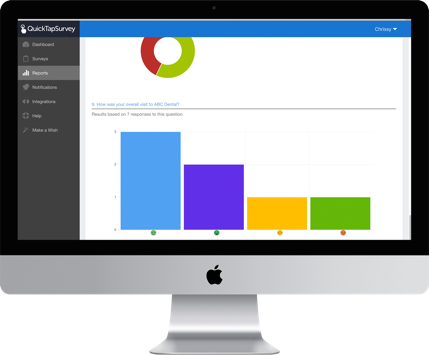
Real-Time Survey Results
Analyze survey responses as soon as they are collected.
-
Multiple Download Formats
View and download survey data in a number of popular file formats.
-
Professional Management Reports
Generate professional PDF reports to share your survey results with others.
-
NPS & Satisfaction Reports
Report on-going satisfaction scores to measure the happiness and loyalty of your customers.
-
Monitor Users
Track users in real-time and monitor their progress by the hour.
-
Send Email Notifications
Alert a person or group of people by email when a survey response meets a specific set of conditions.
-
Score Surveys
Automatically calculate a score for each survey response by assigning a value to each possible answer.
-
Scheduled Reports
Schedule reports to be automatically sent to your inbox.
Have questions about any of our features? Have questions about any of our survey features? Contact us today to get started.
Over 180,000 Clients Worldwide
“I was tasked with setting up two iPads with keyboards for kiosks to take contest entry forms at a trade show. With time running out I was able to create an account, add two users, create an entry form and test it out in under 4 hours. I potentially could have lost a $25,000 a year account without your product.”
Matt Moormeier
President,
GPC Tech Team
“We’ve been really pleased, really pumped to use QuickTapSurvey during our game day and prospecting events throughout the year. I’m just elated as a Sales Manager to be able to decrease our follow-up campaigns from 3 weeks to 24 hours and increase our lead follow-up rates by a whopping 50%.”
Josh Ward Ticket Sales Manager, Tennessee Titans
“We often work with populations that feel more comfortable completing surveys in a face-to-face interview format. With QuickTapSurvey we can easily collect these surveys in the field, and reduce costs by saving on data entry and printing. In our most recent survey, we estimated that we saved about $25,000.”
Dr. Michaela Hynie President, Canadian Association of Refugee & Forced Migration Studies
“We used paper surveys in the past, but they were extremely difficult to manage on-site, not to mention time consuming because of all the data re-entry on Excel. We were very lucky to find QuickTapSurvey when we did.”
Irene Seijo Director, Seijo Associates Ltd.
“QuickTapSurvey is an amazing tool to gather feedback while the patient experience is fresh. It had increased our survey response rate and motivates employees to provide excellent service.”
Claire Bosma Marketing Director, Orthopaedic Associates
“QuickTapSurvey is everything I wanted from a marketing perspective. It’s very flexible, it allows for branding and even works offline! We are using it at every trade show we attend – from LA to Paris – and I haven’t experienced a single situation where I wished it could do more”
Carlos Guevara Marketing & Business Development, DOD Tech Canada
“QuickTapSurvey is so easy to use and even easier to deploy. It was the quick tool that we needed to measure and derive insights around staff compliance on flights.”
Anton Vidgen Senior Director, Customer and Technology, Air Canada Rouge
“QuickTapSurvey is an exceptionally easy tool for collecting visitor feedback and capturing email addresses. It helped improve visitor satisfaction and doubled our email capture rate.”
Thomas Zydel Director of Visitor Services & Membership Virginia Museum of Fine Arts
“QuickTapSurvey is in a league of its own and is the answer to all your lead generation needs. It's an extremely powerful tool, easy to use and the pricing structure makes it very affordable to all. 11/10 Would definitely recommend!”
Erin Dupuis Graphic & Digital Specialist, Trafalgar Tours
“I was tasked with setting up two iPads with keyboards for kiosks to take contest entry forms at a trade show. With time running out I was able to create an account, add two users, create an entry form and test it out in under 4 hours. I potentially could have lost a $25,000 a year account without your product.”
Matt Moormeier
President,
GPC Tech Team
“We’ve been really pleased, really pumped to use QuickTapSurvey during our game day and prospecting events throughout the year. I’m just elated as a Sales Manager to be able to decrease our follow-up campaigns from 3 weeks to 24 hours and increase our lead follow-up rates by a whopping 50%.”
Josh Ward Ticket Sales Manager, Tennessee Titans
“We often work with populations that feel more comfortable completing surveys in a face-to-face interview format. With QuickTapSurvey we can easily collect these surveys in the field, and reduce costs by saving on data entry and printing. In our most recent survey, we estimated that we saved about $25,000.”
Dr. Michaela Hynie President, Canadian Association of Refugee & Forced Migration Studies
“We used paper surveys in the past, but they were extremely difficult to manage on-site, not to mention time consuming because of all the data re-entry on Excel. We were very lucky to find QuickTapSurvey when we did.”
Irene Seijo Director, Seijo Associates Ltd.
“QuickTapSurvey is an amazing tool to gather feedback while the patient experience is fresh. It had increased our survey response rate and motivates employees to provide excellent service.”
Claire Bosma Marketing Director, Orthopaedic Associates
“QuickTapSurvey is everything I wanted from a marketing perspective. It’s very flexible, it allows for branding and even works offline! We are using it at every trade show we attend – from LA to Paris – and I haven’t experienced a single situation where I wished it could do more”
Carlos Guevara Marketing & Business Development, DOD Tech Canada
“QuickTapSurvey is so easy to use and even easier to deploy. It was the quick tool that we needed to measure and derive insights around staff compliance on flights.”
Anton Vidgen Senior Director, Customer and Technology, Air Canada Rouge
“QuickTapSurvey is an exceptionally easy tool for collecting visitor feedback and capturing email addresses. It helped improve visitor satisfaction and doubled our email capture rate.”
Thomas Zydel Director of Visitor Services & Membership Virginia Museum of Fine Arts
“QuickTapSurvey is in a league of its own and is the answer to all your lead generation needs. It's an extremely powerful tool, easy to use and the pricing structure makes it very affordable to all. 11/10 Would definitely recommend!”
Erin Dupuis Graphic & Digital Specialist, Trafalgar Tours
Create your beautiful survey or mobile form today.
Data Integrations
-
Export Leads to Salesforce
Map survey questions to Lead Object fields and export data directly to Salesforce®.
-
Export Contacts to Infusionsoft
Map survey questions to Contact fields and export data directly to Infusionsoft®.
-
Export Emails to MailChimp
Map survey questions to List fields and export data directly to MailChimp®.
-
API Access
Access survey responses programmatically.
-
Connect to Apps With Zapier
Zapier is an online automation tool that helps you connect QuickTapSurvey to your favorite apps.
Have questions about any of our features? Have questions about any of our survey features? Contact us today to get started.
Over 180,000 Clients Worldwide
“I was tasked with setting up two iPads with keyboards for kiosks to take contest entry forms at a trade show. With time running out I was able to create an account, add two users, create an entry form and test it out in under 4 hours. I potentially could have lost a $25,000 a year account without your product.”
Matt Moormeier
President,
GPC Tech Team
“We’ve been really pleased, really pumped to use QuickTapSurvey during our game day and prospecting events throughout the year. I’m just elated as a Sales Manager to be able to decrease our follow-up campaigns from 3 weeks to 24 hours and increase our lead follow-up rates by a whopping 50%.”
Josh Ward Ticket Sales Manager, Tennessee Titans
“We often work with populations that feel more comfortable completing surveys in a face-to-face interview format. With QuickTapSurvey we can easily collect these surveys in the field, and reduce costs by saving on data entry and printing. In our most recent survey, we estimated that we saved about $25,000.”
Dr. Michaela Hynie President, Canadian Association of Refugee & Forced Migration Studies
“We used paper surveys in the past, but they were extremely difficult to manage on-site, not to mention time consuming because of all the data re-entry on Excel. We were very lucky to find QuickTapSurvey when we did.”
Irene Seijo Director, Seijo Associates Ltd.
“QuickTapSurvey is an amazing tool to gather feedback while the patient experience is fresh. It had increased our survey response rate and motivates employees to provide excellent service.”
Claire Bosma Marketing Director, Orthopaedic Associates
“QuickTapSurvey is everything I wanted from a marketing perspective. It’s very flexible, it allows for branding and even works offline! We are using it at every trade show we attend – from LA to Paris – and I haven’t experienced a single situation where I wished it could do more”
Carlos Guevara Marketing & Business Development, DOD Tech Canada
“QuickTapSurvey is so easy to use and even easier to deploy. It was the quick tool that we needed to measure and derive insights around staff compliance on flights.”
Anton Vidgen Senior Director, Customer and Technology, Air Canada Rouge
“QuickTapSurvey is an exceptionally easy tool for collecting visitor feedback and capturing email addresses. It helped improve visitor satisfaction and doubled our email capture rate.”
Thomas Zydel Director of Visitor Services & Membership Virginia Museum of Fine Arts
“QuickTapSurvey is in a league of its own and is the answer to all your lead generation needs. It's an extremely powerful tool, easy to use and the pricing structure makes it very affordable to all. 11/10 Would definitely recommend!”
Erin Dupuis Graphic & Digital Specialist, Trafalgar Tours
“I was tasked with setting up two iPads with keyboards for kiosks to take contest entry forms at a trade show. With time running out I was able to create an account, add two users, create an entry form and test it out in under 4 hours. I potentially could have lost a $25,000 a year account without your product.”
Matt Moormeier
President,
GPC Tech Team
“We’ve been really pleased, really pumped to use QuickTapSurvey during our game day and prospecting events throughout the year. I’m just elated as a Sales Manager to be able to decrease our follow-up campaigns from 3 weeks to 24 hours and increase our lead follow-up rates by a whopping 50%.”
Josh Ward Ticket Sales Manager, Tennessee Titans
“We often work with populations that feel more comfortable completing surveys in a face-to-face interview format. With QuickTapSurvey we can easily collect these surveys in the field, and reduce costs by saving on data entry and printing. In our most recent survey, we estimated that we saved about $25,000.”
Dr. Michaela Hynie President, Canadian Association of Refugee & Forced Migration Studies
“We used paper surveys in the past, but they were extremely difficult to manage on-site, not to mention time consuming because of all the data re-entry on Excel. We were very lucky to find QuickTapSurvey when we did.”
Irene Seijo Director, Seijo Associates Ltd.
“QuickTapSurvey is an amazing tool to gather feedback while the patient experience is fresh. It had increased our survey response rate and motivates employees to provide excellent service.”
Claire Bosma Marketing Director, Orthopaedic Associates
“QuickTapSurvey is everything I wanted from a marketing perspective. It’s very flexible, it allows for branding and even works offline! We are using it at every trade show we attend – from LA to Paris – and I haven’t experienced a single situation where I wished it could do more”
Carlos Guevara Marketing & Business Development, DOD Tech Canada
“QuickTapSurvey is so easy to use and even easier to deploy. It was the quick tool that we needed to measure and derive insights around staff compliance on flights.”
Anton Vidgen Senior Director, Customer and Technology, Air Canada Rouge
“QuickTapSurvey is an exceptionally easy tool for collecting visitor feedback and capturing email addresses. It helped improve visitor satisfaction and doubled our email capture rate.”
Thomas Zydel Director of Visitor Services & Membership Virginia Museum of Fine Arts
“QuickTapSurvey is in a league of its own and is the answer to all your lead generation needs. It's an extremely powerful tool, easy to use and the pricing structure makes it very affordable to all. 11/10 Would definitely recommend!”
Erin Dupuis Graphic & Digital Specialist, Trafalgar Tours
Create your beautiful survey or mobile form today.
Agency & Reseller
-
White Label
Re-brand our web application with your logo, colors and a custom URL.

Have questions about any of our features? Have questions about any of our survey features? Contact us today to get started.
Over 180,000 Clients Worldwide
“I was tasked with setting up two iPads with keyboards for kiosks to take contest entry forms at a trade show. With time running out I was able to create an account, add two users, create an entry form and test it out in under 4 hours. I potentially could have lost a $25,000 a year account without your product.”
Matt Moormeier
President,
GPC Tech Team
“We’ve been really pleased, really pumped to use QuickTapSurvey during our game day and prospecting events throughout the year. I’m just elated as a Sales Manager to be able to decrease our follow-up campaigns from 3 weeks to 24 hours and increase our lead follow-up rates by a whopping 50%.”
Josh Ward Ticket Sales Manager, Tennessee Titans
“We often work with populations that feel more comfortable completing surveys in a face-to-face interview format. With QuickTapSurvey we can easily collect these surveys in the field, and reduce costs by saving on data entry and printing. In our most recent survey, we estimated that we saved about $25,000.”
Dr. Michaela Hynie President, Canadian Association of Refugee & Forced Migration Studies
“We used paper surveys in the past, but they were extremely difficult to manage on-site, not to mention time consuming because of all the data re-entry on Excel. We were very lucky to find QuickTapSurvey when we did.”
Irene Seijo Director, Seijo Associates Ltd.
“QuickTapSurvey is an amazing tool to gather feedback while the patient experience is fresh. It had increased our survey response rate and motivates employees to provide excellent service.”
Claire Bosma Marketing Director, Orthopaedic Associates
“QuickTapSurvey is everything I wanted from a marketing perspective. It’s very flexible, it allows for branding and even works offline! We are using it at every trade show we attend – from LA to Paris – and I haven’t experienced a single situation where I wished it could do more”
Carlos Guevara Marketing & Business Development, DOD Tech Canada
“QuickTapSurvey is so easy to use and even easier to deploy. It was the quick tool that we needed to measure and derive insights around staff compliance on flights.”
Anton Vidgen Senior Director, Customer and Technology, Air Canada Rouge
“QuickTapSurvey is an exceptionally easy tool for collecting visitor feedback and capturing email addresses. It helped improve visitor satisfaction and doubled our email capture rate.”
Thomas Zydel Director of Visitor Services & Membership Virginia Museum of Fine Arts
“QuickTapSurvey is in a league of its own and is the answer to all your lead generation needs. It's an extremely powerful tool, easy to use and the pricing structure makes it very affordable to all. 11/10 Would definitely recommend!”
Erin Dupuis Graphic & Digital Specialist, Trafalgar Tours
“I was tasked with setting up two iPads with keyboards for kiosks to take contest entry forms at a trade show. With time running out I was able to create an account, add two users, create an entry form and test it out in under 4 hours. I potentially could have lost a $25,000 a year account without your product.”
Matt Moormeier
President,
GPC Tech Team
“We’ve been really pleased, really pumped to use QuickTapSurvey during our game day and prospecting events throughout the year. I’m just elated as a Sales Manager to be able to decrease our follow-up campaigns from 3 weeks to 24 hours and increase our lead follow-up rates by a whopping 50%.”
Josh Ward Ticket Sales Manager, Tennessee Titans
“We often work with populations that feel more comfortable completing surveys in a face-to-face interview format. With QuickTapSurvey we can easily collect these surveys in the field, and reduce costs by saving on data entry and printing. In our most recent survey, we estimated that we saved about $25,000.”
Dr. Michaela Hynie President, Canadian Association of Refugee & Forced Migration Studies
“We used paper surveys in the past, but they were extremely difficult to manage on-site, not to mention time consuming because of all the data re-entry on Excel. We were very lucky to find QuickTapSurvey when we did.”
Irene Seijo Director, Seijo Associates Ltd.
“QuickTapSurvey is an amazing tool to gather feedback while the patient experience is fresh. It had increased our survey response rate and motivates employees to provide excellent service.”
Claire Bosma Marketing Director, Orthopaedic Associates
“QuickTapSurvey is everything I wanted from a marketing perspective. It’s very flexible, it allows for branding and even works offline! We are using it at every trade show we attend – from LA to Paris – and I haven’t experienced a single situation where I wished it could do more”
Carlos Guevara Marketing & Business Development, DOD Tech Canada
“QuickTapSurvey is so easy to use and even easier to deploy. It was the quick tool that we needed to measure and derive insights around staff compliance on flights.”
Anton Vidgen Senior Director, Customer and Technology, Air Canada Rouge
“QuickTapSurvey is an exceptionally easy tool for collecting visitor feedback and capturing email addresses. It helped improve visitor satisfaction and doubled our email capture rate.”
Thomas Zydel Director of Visitor Services & Membership Virginia Museum of Fine Arts
“QuickTapSurvey is in a league of its own and is the answer to all your lead generation needs. It's an extremely powerful tool, easy to use and the pricing structure makes it very affordable to all. 11/10 Would definitely recommend!”
Erin Dupuis Graphic & Digital Specialist, Trafalgar Tours